AI-powered supplier compliance

Stop chasingsupplier evidence.

Collect supplier documents, check COAs, and review supplier risk, with the evidence behind every decision.

Sample data · Lot AP-0248Scroll

One number, outside spec.

Now what?

Each TraceR2C product picks up a different part of that question.

01ComplianceFlowCollect

Get every supplier document, without the inbox ping-pong.

ComplianceFlow sends your requirements to each supplier, follows up until the evidence arrives, and keeps every certificate and renewal date in view.

  • RequestSend a supplier the documents and requirements you need.
  • Follow upReminders go out automatically until the document is received.
  • TrackExpiry dates are watched, so renewals don’t lapse unnoticed.
You give it

Your requirements and your suppliers.

You get

Verified documents on file and an audit-ready trail.

Explore ComplianceFlow
Supplier onboarding · Auburn IngredientsSample data
Requirements4 of 5 received
  • Certificate of analysisRenews in 30 daysReceived
  • Quality certificateRenews in 11 monthsReceived
  • Allergen statementNo expiryReceived
  • Product specificationVersion 3Received
  • Supplier questionnaireRequested 6 days agoAwaiting response
Reminder sent to the supplier. Next follow-up scheduled.
02COA AnalysisCheck

Let the software read the certificate. You set the rules.

COA Analysis takes in each certificate of analysis, extracts every result, and compares it with your specification, so your team reviews exceptions instead of PDFs.

  • ExtractFinds the results table and reads parameter, value, unit and method.
  • GradeChecks each parameter against your spec: pass, fail or out of tolerance.
  • EscalatePuts exceptions in front of a reviewer, who signs off.
You give it

Your specifications, and the certificates your suppliers send.

You get

Every result graded, and only the exceptions to review.

Explore COA Analysis
COA review · Pea protein · Lot AP-0248Sample data
  1. Upload
  2. Extract
  3. Normalize
  4. Grade
  5. Review
ParameterReportedSpec PP-04
Protein82.1%min 80.0%
Ash3.1%max 4.0%
Moisture6.4%max 6.0%!
Fat1.2%max 2.0%
1 exception sent to the reviewer: moisture is 0.4 points over the limit.

03Supplier RiskAssess

A risk score for every supplier, and the reasons behind it.

Supplier Risk watches the signals around a supplier and folds them into one score from 0 to 100, with a breakdown that shows what is driving it.

  • WatchCompliance, document and operational signals, scanned continuously.
  • ExplainEach driver is weighted and linked back to its source record.
  • ActRequest details or export an audit-ready report, then track the score as it falls.
You give it

A connected supplier.

You get

A ranked, explainable view of your supplier base.

Explore Supplier Risk
Supplier risk · BlueRiver Co-PackersSample data
73/100
High risk▼ 6 pts after review
  • Document22
  • Operational18
  • Regulatory15
  • Market / Geo12
  • Reputation6
  • Certificate expiring soonDocument
  • Regulatory signal to check against this supplierRegulatory
  • Supplier response time above benchmarkOperational
Details requested from the supplier. Review in progress.

04Compliance CompassAsk

Ask your records a question. Get an answer you can trace.

Compliance Compass is a search-and-ask workspace for your compliance records. Type a question in plain English and it points to the documents and issues that need attention.

  • AskType a question, or @ a supplier to focus on it.
  • ExploreSearch suppliers, browse documents and check compliance gaps.
  • TraceAnswers show which records they came from, with follow-up questions suggested.
You give it

A question, in your own words.

You get

An answer from your records, with its sources.

See Compliance Compass
Compliance Compass · DiscoverySample data

Explore suppliers, documents, and compliance insights

Search SuppliersBrowse DocumentsCompliance GapsInsights
Searching your records

The moisture result needs clarification, and the supplier questionnaire is still outstanding.

COA AP-0248Supplier onboarding recordSpecification PP-04

Illustrative answer

05RecallChainRespond

When a lot is affected, run the whole recall from one place.

RecallChain coordinates a recall case across the affected lots and your supply-chain partners, with the context of the case always in view.

  • OpenStart a case from the affected lot and its supplier record.
  • ConnectLink the lots and the partners that need to act.
  • CoordinateKeep every step of the case in one shared record.
You give it

The affected lot.

You get

One connected recall case instead of many threads.

See RecallChain
Recall case · Lot AP-0248Sample data
Case opened3 of 3 partners notified
Supplier Lot AP-0248 Partner A Partner B Partner C
  • Case opened for Lot AP-0248
  • Affected lots linked to the supplier record
  • Partners notified and tracking the case

A workspace you can explore

Open a supplier.
Follow the record.

The sample workspace shows how documents, results and risk signals sit together. Nothing in it is real customer data.

Open the sample workspace
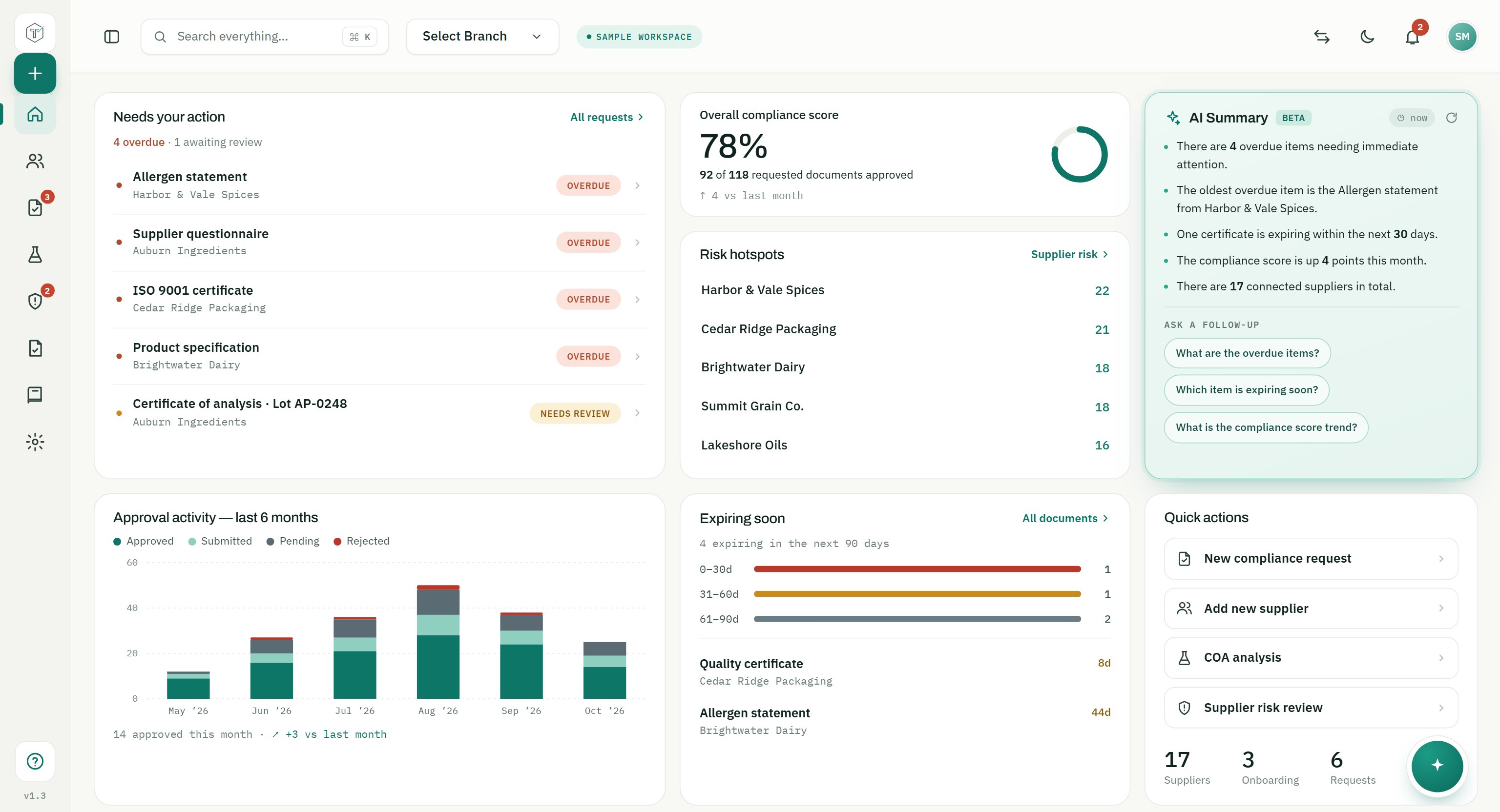
Sample TraceR2C workspace dashboard with items needing action, an overall compliance score, risk hotspots, an AI summary and approval activity. All supplier names and figures are fictional sample data.

Meet TraceR2C

The company, in 87 seconds.

The reference shelf

Keep the requirements within reach.

Explore the standards and regulations that shape supplier compliance.

Browse all 16 framework guides
Practical preparationAudit-readiness checklistA free 18-point checklist to find out if your supplier compliance program would survive an audit today.

    Questions

    Before you get started.

    Have a specific workflow in mind?
    Let’s walk through it.

    Where does AI stop and my team take over?

    COA Analysis extracts reported results and compares them with the specifications you set. Your team reviews flagged exceptions and makes the decision.

    How is this different from a document folder?

    A folder stores files. TraceR2C connects supplier documents with requirements, checks, risk signals, and review records so the context stays with the evidence.

    Can I explore the product before a demo?

    Yes. The product preview uses sample records and needs no account. You can explore its sections; uploads and other actions are disabled.

    Open the sample workspace
    How would we get started?

    Book a demo to walk through your supplier-document process, the specifications you check, and the systems your team uses. We’ll discuss how TraceR2C fits that workflow.

    Book a demo

    Bring your supplier workflow.

    Let’s work through it.

    Book a demo